

Assignment 1: Setup Dreamweaver
Files and folders
Dreamweaver is part of Adobe Creative Cloud and it's likely that you already have access to the software. We'll be using DW as a code editor not as a design tool. So non of the pre-coded, template based featured will be used. Although DW has some useful features such as the side be side code/design comparison, it's possible to use a different, more affordable code editor instead if you don't have access to DW. If that's the case please let me know.
Create a folder hierarchy that matches the example below. We'll be adding all the CSS files as well as the font files later. But I recommend to setup this folder structure before you start opening and HTML document in Dreamweaver.

The image above shows the final organization of files and folders. Use your last name for main directory/folder. Dreamweaver refers to this later as the "Local Site Folder" (containing all of your folders, coded files, fonts, HTML, CSS).
When you're working on a web project you should pay close attention to file names. In general avoid upper case letters and blank spaces. Instead use hyphens or underscores.
Dreamweaver
Create a "New Site" in Dreamweaver and link it with the "Local Site Folder" you created earlier ("last name" in the example above).
First open Dreamweaver and create a new project by choosing SITE > NEW SITE from the top menu
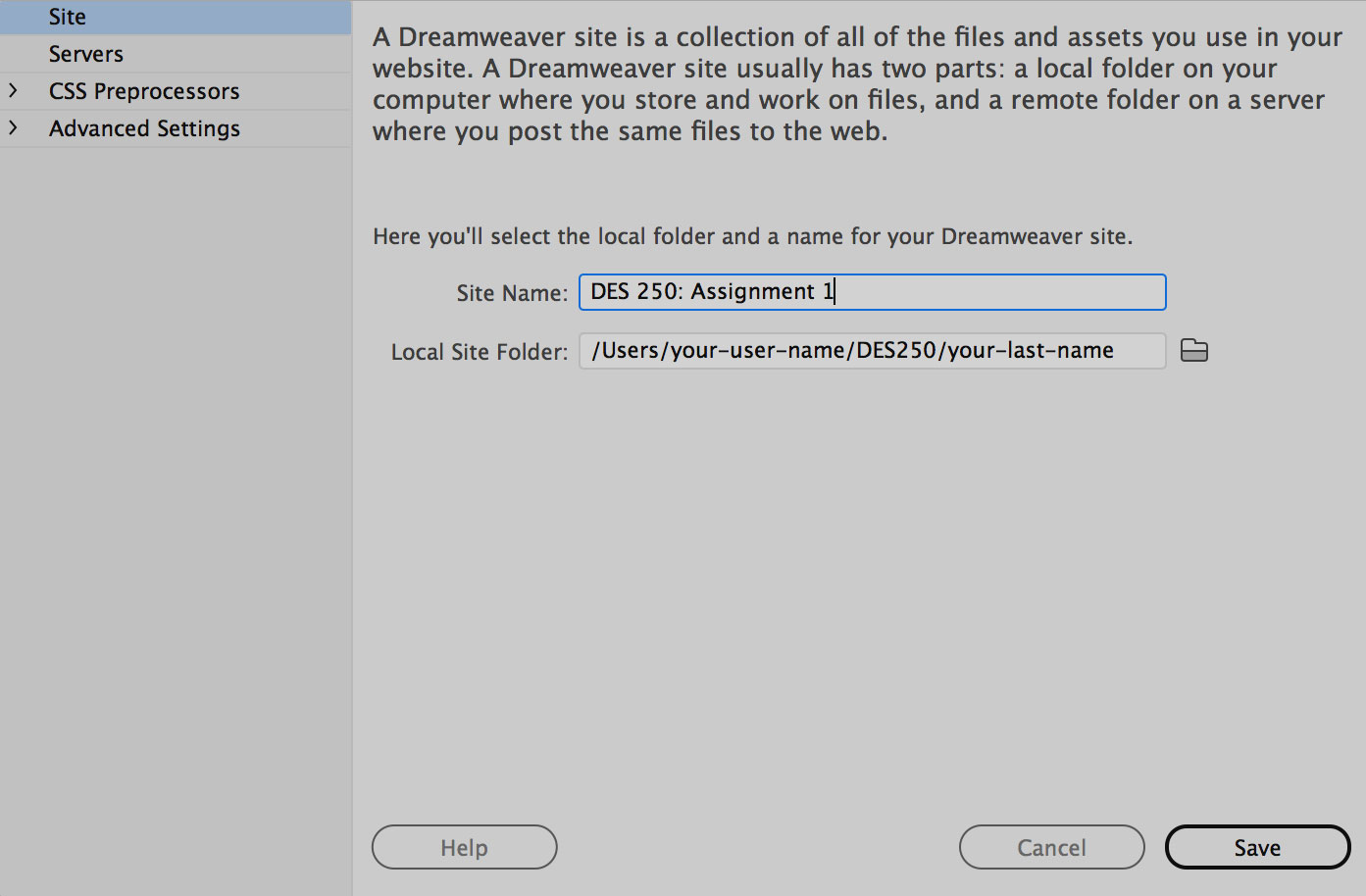
The Site Name identifies Dreamweaver projects. I suggest "DES 250: Assignment 1". Then use the folder-icon to browse to your Local Site Folder. It's important not to move this site folder to a different location on your hard drive after you've done this. The link to the site folder would break. It can be re-linked again but it may cause confusion initially, so better to avoid from the beginning.
Then create a HTML page by choosing FILE > NEW. Select a blank HTML document an hit CREATE.

I'll explain the Dreamweaver basics on the projector during class. After you created the blank HTML save it right away into the first recipe folder. Call it "recipe-1.html".
Dreamweaver Alternatives
If you don't have access to the DW software you can work with any other code editor. Although I haven't been using it yet BRACKETS seems to be a good (and free) alternative. It has a "live view" feature which means that you can simultaneously code and see the result in a browser. You can download BRACKETS here. Since I can't introduce 2 code editors you need to learn how to use it yourself. There's documentation and an intro video on the brackets website. At first glance it seems pretty simple. You really only need to learn how to install it and how to get started.